How to Promote Your Etsy Shop on TikTok (No Dancing)
To promote your Etsy shop on TikTok, post short product videos and send viewers to your shop through the link in your TikTok bio. The setting that matters first is that link: TikTok’s help page says you can add a website link with at least 1,000 followers or a Verified Business Account, so check that your profile qualifies before you plan anything else. This is the playbook for sellers who keep selling on Etsy and use TikTok for traffic, not for selling inside TikTok Shop.
Can you link your Etsy shop on TikTok?
Yes, through the website link in your profile. According to TikTok’s support page on profile links, you can add a website link if you have at least 1,000 followers or a Verified Business Account. You add it under Edit profile, then tap Add next to Links. TikTok updates this screen, so open Edit profile in your own app and confirm what it offers you.
| Your situation | What to do |
|---|---|
| Under 1,000 followers, no verification | Link is not available yet. Put your Etsy shop name in your username and bio, and keep posting. |
| 1,000 followers or more | Add the Etsy shop URL under Edit profile > Links. |
| Verified Business Account | Link available without the 1,000 follower count. |
Most guides I found say you need a Business account plus about 1,000 followers and skip the verification route. The catch is that business verification is for users 18 and over, needs a valid business license matching the region where the business operates, and the review typically takes 1 to 5 business days. If you sell as a hobby without a license, the follower route is the realistic one.
Two practical tips from the third-party guides: switching to a Business account is free and done from settings, and it helps to claim a username that matches your Etsy shop name first (Marmalead’s beginner guide).
If you want listings to be bought inside TikTok instead, that is a different setup with different rules. I cover it in TikTok Shop for print on demand.
5 video formats that work for Etsy products
You do not need to dance or show your face. Every format below can be made from product photos.
- Problem and product hook. Open on the situation your buyer is in, then show the item. “Your dog deserves a shirt, too” is a hook for a custom pet tee. For more openers to copy, see 30 video ad hooks for products.
- In-use scene. Someone wearing, holding or gifting the product in a real setting. Buyers want to see size and context, which flat listing photos cannot show.
- Detail close-up. The print, the engraving, the stitching, the name on the item. This is the shot that answers “is the quality real?”
- Gift moment. The box being opened and the reaction. It suits jewelry, mugs and personalized items.
- Process or packing. Packing an order, a design coming together, a finished batch. Third-party guides list this one as a common starting point, and it needs no model at all.
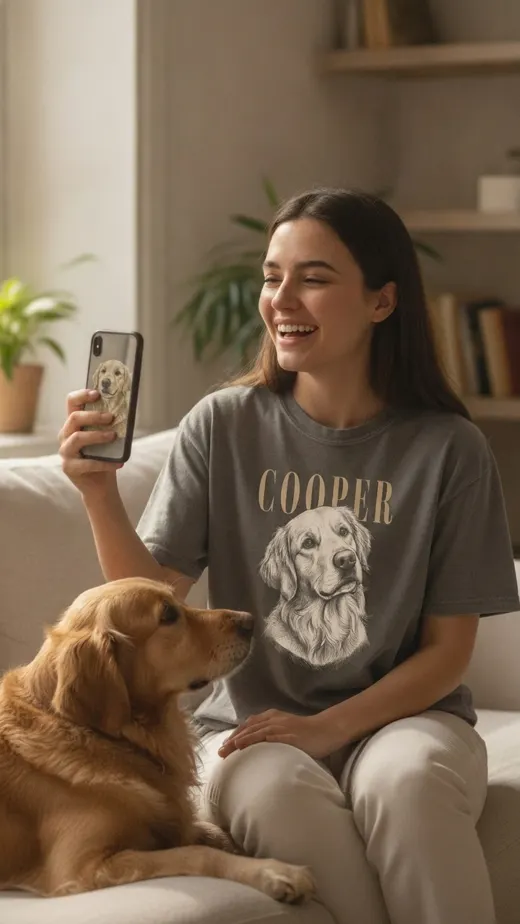
Here are formats 1 and 2 (plus a detail close-up) in one finished ad. It is a 15 second, 9:16 video for a custom dog portrait tee, made from a single product photo.
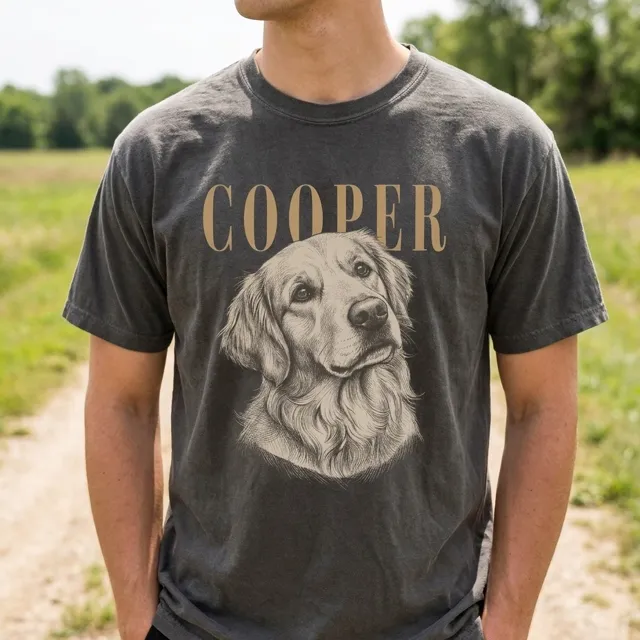
The script is four short beats: the hook (“Your dog deserves a shirt, too”), what the product is (a fine-line sketch of your dog on a charcoal tee), who it is for (wear it or gift it to a dog person), and a one-line ask. The shots are a woman laughing with her dog, a man wearing the tee at a dog park, a close-up of the print and the name, the tee laid flat, then an end card. If you want a template for writing your own, use this 15 to 20 second script template.
Format 4, the gift moment, is the necklace ad below. It is a 9:16 video of about 20 seconds for a gold open-heart necklace, and it opens on a woman opening the gift box on a sofa. The hook is “Husbands, still stuck on what to get her?”
For an in-use scene (format 2), this is one frame from the dog tee ad: a woman laughing on the couch with her golden retriever, wearing the tee.
How to make videos from product photos and how often to post
I would not give you a posts-per-day number, because the ones circulating in guides have no official source behind them. Pick a cadence you can keep for 8 weeks, then batch to hit it.
A batching method that works without filming:
- Pick 3 to 5 listings you most want to sell.
- For each, write one hook and one 15 to 20 second script.
- Make the video for each in one sitting, so you have a stack ready to post.
- Reuse the same listing with a different hook later, rather than posting a new product each time.
Here is an example week built on that method. It is an example, not a rule, so scale it to what you can keep up:
- Batch day: make the videos for your 3 to 5 listings in one sitting.
- Post day 1: a hook video for your first listing.
- Post day 2: an in-use scene for a second listing.
- Post day 3: a detail close-up of the print, engraving or name.
- Post day 4: a gift moment video.
- Post day 5: a packing video, then the first listing again with a new hook.
To make the videos themselves, you can film on your phone or use an AI tool. LzyPOD Video Ads turns product photos into a finished 15 to 20 second vertical ad with new AI scenes of people using the product, voiceover, captions and music. It costs 25, 45 or 60 credits depending on the motion, and a free account has 15 credits, which is not enough for one video ad. The seller photos are reference only and are never shown in the ad. Here is the input photo behind the dog tee ad above:
For a wider look at ad-style videos without hiring creators, see UGC-style ads without creators.
Video specs to export for TikTok
For ads, TikTok’s In-Feed specs recommend vertical 9:16 at a minimum of 540x960 px. Accepted file types include .mp4 and .mov, and files must be 500 MB or less. A 15 to 20 second 9:16 export clears all of that. Ad text on regular (non-Spark) In-Feed ads cannot contain clickable links, @ symbols or hashtags, so put your Etsy link in your profile or, with Promote, in the URL and call to action you enter during setup. For the full size table across platforms, see video ad sizes for Facebook, Instagram and TikTok.
Organic vs paid: Spark Ads and Promote
Post organically first. Pay to push only the videos that already look like they work.
Spark Ads are a native ad format that uses your organic TikTok posts as ads. Views, comments, shares, likes and follows you gain while boosting are credited to the original post. You select your TikTok account as the identity when you create one in Ads Manager, and the display name and text come from the organic post, so you cannot edit them in ad creation.
Ads Manager has real minimums. According to TikTok’s budget page, the campaign budget must exceed $50 and the ad group daily budget must exceed $20. For a lifetime ad group budget, the minimum is the total number of days times $20. For a one-product Etsy shop, that is a real commitment before you know whether TikTok sends buyers.
Promote is the lighter option. It is the in-app boost, and it has a “More website visits” goal. Per TikTok’s setup page for website visits, you pick the goal under Get sales, enter your URL and a call to action, select the video, choose a promotion pack or set your own audience, budget and duration, then pay. Ads Manager and the TikTok Pixel are not required for website visits, only for conversions. Promote’s eligibility rules say you must be 18 or over, have a creator or Business Account, use public content, and use original sound or sound cleared for commercial use. I did not find a stated minimum budget for Promote on that setup page, so check the budget screen in the app before you commit.
How to see TikTok traffic in Etsy Stats
This is where it gets fuzzy. Etsy’s Shop Stats Glossary describes the Social media traffic source as visits from Instagram, Facebook, Pinterest and other social media websites. TikTok is not named in Etsy’s docs, so I cannot tell you it shows up as its own line. Open Stats, check the traffic sources breakdown, and see where your TikTok visits land after a week of posting.
Etsy’s help page on using Stats lists traffic sources including Direct and other traffic, Social media, Etsy Ads and Offsite Ads. For cleaner attribution, a TikTok-only coupon code is one practical idea that a third-party guide suggests (megadigital.ai): mention the code in the video, then count how many orders use it. Before you judge results, compare against your own baseline, and read whether Etsy listing videos increase sales for how to run a clean test.
Common questions
Can you link your Etsy shop on TikTok?
Yes, in your profile link, if you have at least 1,000 followers or a Verified Business Account, per TikTok’s support page. Check Edit profile in your own app to see whether Links is available to you.
Do you need 1,000 followers to put a link in your TikTok bio?
Not if you have a Verified Business Account, which TikTok lists as the alternative. Verification needs a valid business license for your region and typically takes 1 to 5 business days.
Do I have to dance or show my face to promote Etsy on TikTok?
No. Product close-ups, in-use scenes, gift moments and packing videos all work, and you can make them from product photos instead of filming yourself.
How much does it cost to advertise an Etsy product on TikTok?
In Ads Manager, the campaign budget must exceed $50 and the ad group daily budget must exceed $20. Promote’s website-visits flow lets you set your own budget in the app, so check the budget screen before you pay.
Is TikTok worth it for Etsy sellers?
There is no reliable public data on this. Post consistently for a few weeks, then compare your Social media traffic in Etsy Stats and your TikTok coupon redemptions against your baseline. Etsy’s docs list Social media and name Instagram, Facebook and Pinterest but not TikTok, so a TikTok-only coupon code gives a clearer count.
Turn one product photo into a video ad
LzyPOD Video Ads writes the script, makes new scenes of your product, adds voice and music, and edits it all into a ready-to-post ad. No filming, no editing.
See example ads → Free to try · no card needed