How to Make UGC Ads Without Creators (3 Routes)
Yes, you can make UGC-style ads without hiring creators. There are three routes: film it yourself, use an AI avatar talking-head tool, or generate AI scenes of people using your product from your product photos. For a small POD or Etsy seller, the third route is usually the cheapest one that still shows a real-looking person using the product. Whichever you pick, AI-made people come with labeling rules on TikTok and Meta, and you should never present them as real customers.
What makes an ad read as UGC
“UGC-style” is a look, not a legal category. The ads that get called UGC usually share four traits:
- Phone-style framing. Vertical, slightly imperfect, not a studio setup.
- A real setting. A couch, a kitchen, a park, not a white background.
- A person actually using the product. Wearing it, holding it, opening it.
- A casual voiceover. Talking to you, not reading a spec sheet.
Notice that none of these require a specific human with a specific following. That is why you can get the look without a creator. What you can’t get without a creator is a genuine testimonial, and that matters for the honesty section below.
Route 1: film it yourself
This is the baseline. You need your phone, daylight, a product sample, and a person willing to wear or hold it (you, a friend, a family member).
Where it works: products you can easily hold or show, like mugs, stickers or small items. One sample and a window with good daylight is often enough.
Where it breaks down for POD sellers:
- Apparel needs a body. Hoodies and tees look much better on someone than flat on a bed.
- Samples cost money. You pay for the product and shipping before you know whether the design sells. If you’re running a tight budget, see how much it costs to start print on demand.
- It doesn’t scale to testing. POD works by testing many designs. Reshooting every time you add a design is the bottleneck.
- You still have to edit. Captions, voiceover and music take time.
If you only run one or two hero products, filming yourself is fine. If you test many designs, it stops making sense quickly.
Route 2: AI avatar talking-head tools
These tools generate a person who looks at the camera and speaks your script. The pitch is a creator-style testimonial without the creator.
What they do well: the “person talking to camera” format. If your ad is mostly someone explaining a hook, an avatar covers that.
What to test before paying: how the avatar handles your actual product. A talking head is not a person using the product. Run a test with your own item and check three things:
- Does the product look like your product, with the right print and shape?
- Does the product look the right size when held or worn?
- Do the hands and the way it’s handled look natural?
The pitch for these tools centres on the face and the script, so product handling is the thing to check first. Prices vary by tool and plan, so check each pricing page for the current numbers rather than trusting a blog post’s figure, including mine.
Route 3: AI scene ads from product photos
This route skips the talking head. You give the tool product photos, and it generates new scenes of people using the product, plus the script, voiceover, captions and music.
This is what LzyPOD Video Ads does. You upload product photos and get a finished 15 to 20 second ad with new AI scenes of people using the product at real size, a script and voiceover, word-by-word captions, music and a branded end card. It outputs 1:1, 4:5 or 9:16. Your photos are reference only and are never shown in the ad.
Worked example: one Cooper tee photo to a 15-second ad
The input was a single photo of a man wearing a charcoal tee with a golden retriever sketch named Cooper:
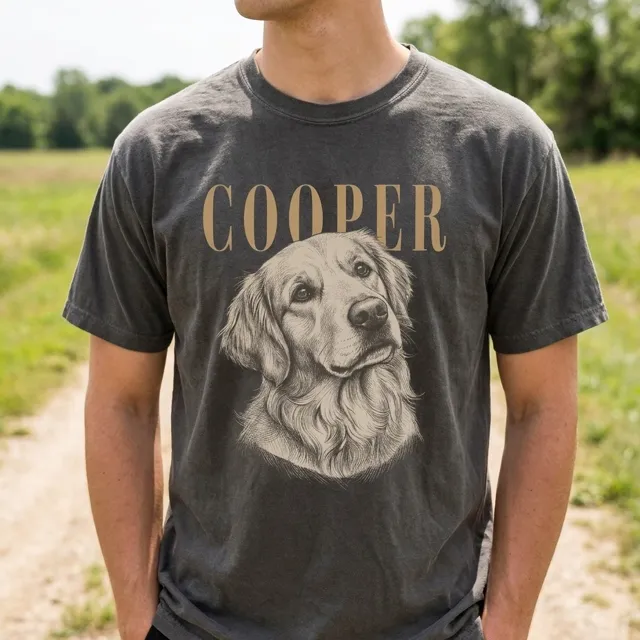
From that one photo, the tool wrote a script (“Your dog deserves a shirt, too. Upload one photo, type their name, and boom: a fine-line sketch portrait of your best friend on a washed charcoal tee…”) and generated new scenes. The scenes are not the input photo. The people in them are AI-made:
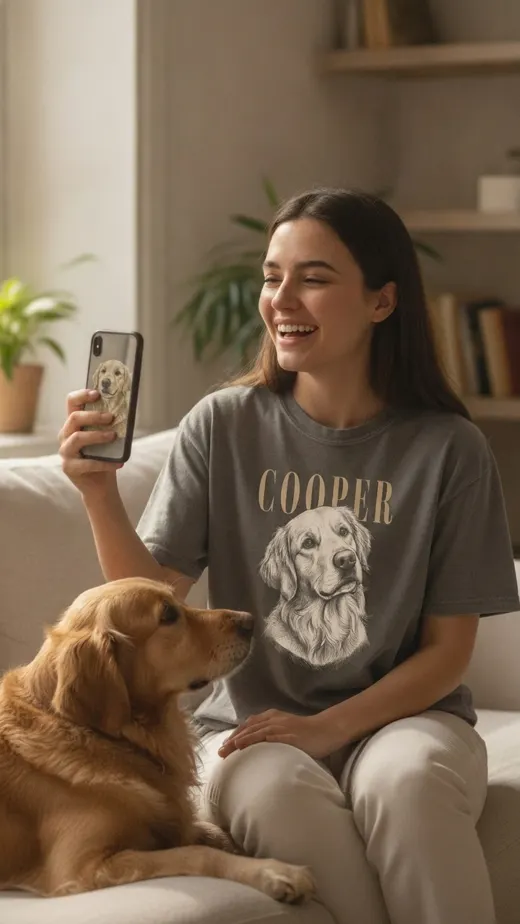
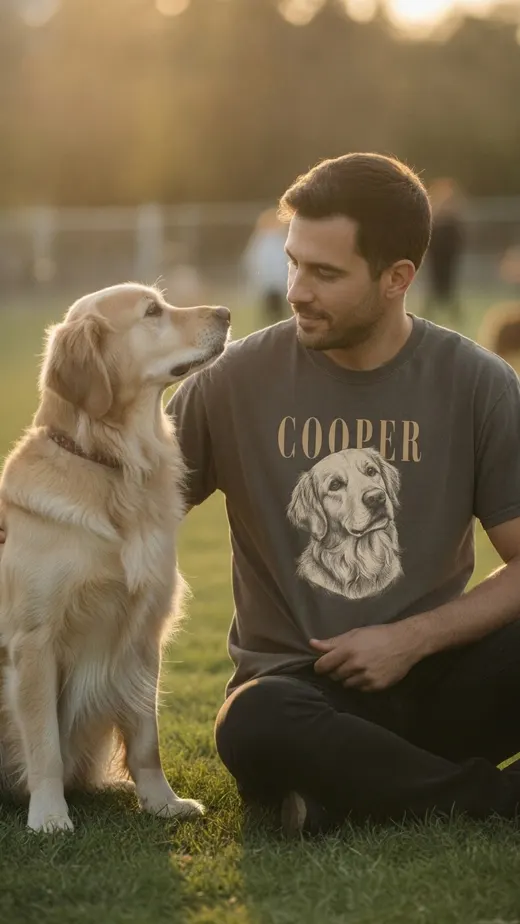
The full shot list was: a woman laughing at her phone on the couch with her dog (the hook), a man wearing the tee at a dog park, a close-up of the print and the name, the tee laid flat, and an end card with “Make yours”. Here is the finished ad:
What a video ad costs in credits: a video ad is 25, 45 or 60 credits depending on how much motion you choose. Edits are 5 credits for the script, voice, music or end card, and 8 credits per re-shot scene. The free account gives you 15 credits, which is not enough for one ad, so check the pricing section for what a credit pack costs before you plan a test.
The limits, honestly:
- The scenes are regenerated, so check the close-up of your print against the real product before you run the ad. If it’s off, re-shooting that scene costs 8 credits.
- It is built for people using products. If you want a face talking to camera for the whole ad, Route 2 is the better fit.
- The people are AI-made. That has disclosure consequences, covered below.
This works well for pet, gift and personalized products where the emotional moment (someone laughing with their dog, opening a gift) carries the ad.
The three routes compared
| Film it yourself | AI avatar tools | AI scenes from product photos | |
|---|---|---|---|
| Cost per ad | Your time, plus the sample and shipping | Check each tool’s pricing page | 25, 45 or 60 credits |
| Time | You shoot and edit every ad | Script in, clip out | Photos in, finished ad out |
| Shows real product use | Yes, if you have a model | Test it; the focus is the face | Yes, as AI-made people using it |
| Voiceover | You record it | Included, from the avatar | Included, plus captions and music |
| Edit cost | Your time to reshoot | Depends on the tool | 5 credits for script, voice, music or end card; 8 per re-shot scene |
| Best for | One or two hero products | Talking-head hooks | Testing many products fast |
None of these gives you a real customer’s testimonial. If you want that, ask actual buyers for photos or clips and get their permission.
Disclosure and ad policies
AI-made people mean you need to check platform labeling rules. Here is what the official sources say, and where I could only find secondary reporting.
TikTok
- TikTok Ads Manager has three disclaimer types: standard, clickable and AI-generated content. The AI disclaimer is listed as mandatory for AI-generated, synthetic or manipulated media, meaning image, video or audio that is completely AI-generated or real material significantly modified by AI. It adds a text label to the ad saying it includes AI-generated content. TikTok: About ad disclaimers
- It applies to regular TikTok ads that are not Spark Ads. Spark Ads run organically, so they follow the Community Guidelines AI-content disclosure instead. The label shows at the bottom of in-feed ads, so you don’t build it into the video. TikTok notes the feature may not be available on every account. TikTok: Add disclaimers to ads
- For organic posts and Spark Ads, TikTok’s Community Guidelines require labeling AI-generated or significantly edited content that shows realistic-looking scenes or people. Unlabeled content may be removed, restricted or labeled by TikTok. TikTok: Integrity and authenticity
- Separately, TikTok’s ad policy bans deceptive or misleading claims about a product and unrealistic expectations about its characteristics. TikTok: Deceptive practices
Meta
I couldn’t find Meta’s own policy page in my research, so treat this as reported, and confirm on Meta’s business help pages before you run ads.
- According to Marketing Dive, Meta said it will automatically label ad content created or edited with some of Meta’s own generative AI tools or with third-party generative AI tools. Marketing Dive
- Per Affiverse Media’s report on Meta’s June 1, 2026 update, Meta now detects some ads made with external AI tools using industry-standard signals and shows an “AI info” label in “About this ad”. Affiverse Media
- Third-party compliance guides say mandatory advertiser self-disclosure applies to ads about social issues, elections or politics, not regular product ads. 1ClickReport
The honesty part
“Fake UGC” is the phrase people search, but the line that matters is simple. An AI person using your product in a scene is an illustration. An AI person saying “I’ve used this for months and it changed my life” is an invented testimonial. I’m not citing a regulation here, just stating the rule I follow: don’t write fake reviews, don’t claim a real customer exists when one doesn’t, and label AI content where the platform asks you to. It’s also the safer position under TikTok’s deceptive practices policy above.
How to know if it works for your product
I don’t have a sourced benchmark for how AI UGC ads compare with creator ads, and the numbers that circulate are mostly vendor claims. The reliable way is to test it:
- Pick one product and make two or three versions: different hooks or different routes.
- Run them at a small budget against the same audience.
- Keep the winner and kill the rest.
AI tools for print on demand shows where video fits in the wider workflow.
Common questions
Can you make UGC ads without hiring creators?
Yes. You can film it yourself, use an AI avatar tool, or generate AI scenes from your product photos. The right route depends on whether your product needs to be shown in use or whether a talking head is enough.
Do I have to label AI UGC ads on TikTok?
For regular TikTok ads that aren’t Spark Ads, TikTok lists the AI-generated content disclaimer as mandatory when the ad contains fully AI-generated or significantly AI-modified image, video or audio. Spark Ads follow the Community Guidelines labeling rules instead. Check the current help pages, since TikTok updates them.
Does Meta require an AI label on ads?
Trade press reports that Meta labels some AI-made ads automatically, including ones made with third-party tools. Mandatory self-disclosure is reported to apply to political and social issue ads. Confirm the current rules on Meta’s business help pages before you advertise.
Is it okay to use AI people in a UGC-style ad?
Showing an AI-made person using your product, with the labels the platform asks for, is different from inventing a testimonial. Don’t present AI people as real customers or write reviews that never happened.
Can I use my own product photos in the ad?
With LzyPOD Video Ads, your photos are reference only and are never shown. The tool generates new scenes of people using the product, so check that the print and details in those scenes match your real product before running the ad.
Turn one product photo into a video ad
LzyPOD Video Ads writes the script, makes new scenes of your product, adds voice and music, and edits it all into a ready-to-post ad. No filming, no editing.
See example ads → Free to try · no card needed